

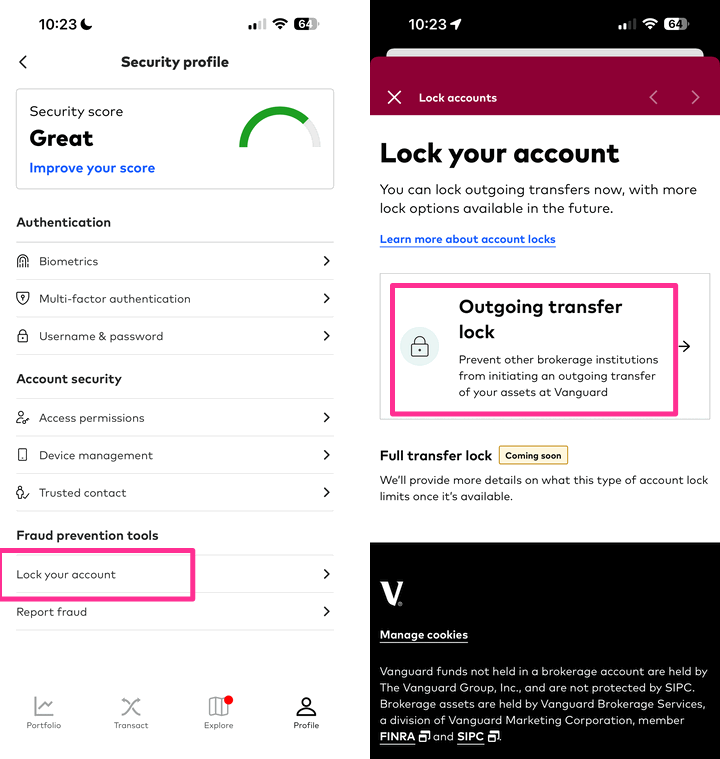
Vanguard recently rolled out a new “Security Score” that encourages folks to activate all of the various security features they have available, and included is a new feature called “Outgoing Transfer Lock”. This is an important and useful option that I think all Vanguard customers should activate immediately.
Background on ACAT transfer scams. Instead of hacking your Vanguard account directly, a thief will obtain enough of your personal information to open a new brokerage account somewhere else, say E*Trade, and then they will request an ACAT transfer of the entire contents of your existing brokerage account (ex. Vanguard) to that new fake E*Trade account which they control. At this point, they can quickly liquidate the account and send the money elsewhere. The key here is that they just need to be able to open an empty, new brokerage account in your name plus find your Fidelity account numbers from somewhere. They don’t need your Fidelity username and password (or pass two-factor authentication, etc).
This loophole, ironically, comes from FINRA Rule 11870, which was created to protect consumers from a broker not letting you leave them. If you request a transfer, the old broker has one business day to validate the authenticity, and then they only have 3 business days to complete the transfer. If they don’t complete the transfer in a timely manner, the old broker gets into trouble with the regulatory agency FINRA. Thus, the pressure is actually on your old broker to approve it quickly. They are not even required to notify you of the transfer. In fact, with nearly every legitimate ACAT transfer I’ve completed, the old broker never made a peep.
Fidelity was the first major brokerage to create a Money Transfer Lockdown feature in response, where you can opt-in to an extra layer of verification to prevent unauthorized transfers (both ACAT and bank ACH). Vanguard’s “Outgoing Transfer Lock” applies to ACATs only, with a different option called “Full Transfer Lock” that includes bank transfers coming later. Here’s the wording taken directly from the Vanguard website:
What is an outgoing transfer lock?
An outgoing transfer lock prevents ACAT, or Automated Customer Account Transfer. This is a standard system brokerages use to transfer assets between institutions. Another brokerage institution should only initiate ACAT after you’ve opened an account with them and asked them to transfer your assets from Vanguard.
Locking your accounts for outgoing transfers protects your assets from being moved to an outside brokerage institution without your consent—a common type of fraud. It doesn’t apply to bank transfers you initiate, so you still have access to your money.
What is a full transfer lock? (Coming soon)
A full transfer lock prevents all money movement into and out of your account, including fund transfers to and from other brokerage institutions. Additional details about specific limitations will be provided once this account lock is available.
Essentially, this means that for someone to steal your assets, they would also need to be able to log into your brokerage account and disable the transfer lock. You can still move your assets when you really want to, it’s just harder to fake. Therefore, I believe this is should be turned on by basically everyone.
Activation instructions. Here’s how to find it on the website:
Log in at Vanguard.com Click on “Profile” at the top-right corner, and then “Security Profile” Scroll down to “Outgoing transfer lock” and click on “Manage” Enable for all or selected accounts.This also works in the app:
Log into your Vanguard app Click on “Profile” at the bottom-right corner, and then “Security Profile” Scroll down to “Fraud Prevention Tools” and click on “Lock your account” Enable for all or selected accounts.While you’re there, you can review all of your other security settings as well.


![Best Hyperliquid Referral Code in 2026: [HYPERLIQUIDREVIEW] – $100 Bonus and 30% Cashback on Trading](https://www.cryptoninjas.net/wp-content/uploads/hyperliquid-logo-330x330.webp)


 Bengali (Bangladesh) ·
  English (United States) ·